Social Media Post: Linkedin
Mappedin MCP Server and the navigation agent built on top of it are closely aligned with the Mappedin Grocery Demo Map.
You can view the demo map here:
https://app.mappedin.com/map/6679882a8298d5000b85ee89?floor=m_f62f718116360827
The Stock Tracker MCP Server also includes items that match the layout and content of this demo map.
If users want to work with a new or custom map they will need to use Mappedin services to generate and integrate that map properly.
Mappedin MCP Server 🗺️
A Model Context Protocol (MCP) server that provides indoor navigation capabilities using the Mappedin API. This server enables AI agents to help users navigate indoor spaces such as shopping malls, airports, hospitals, and other large buildings.
🎯 Overview
This MCP server acts as a bridge between AI agents and the Mappedin indoor mapping platform, allowing users to receive turn-by-turn navigation instructions within indoor environments. The server maintains user location state and provides natural language directions that can be easily consumed by voice assistants or chatbots.
🎥 Demo
Watch the server in action:
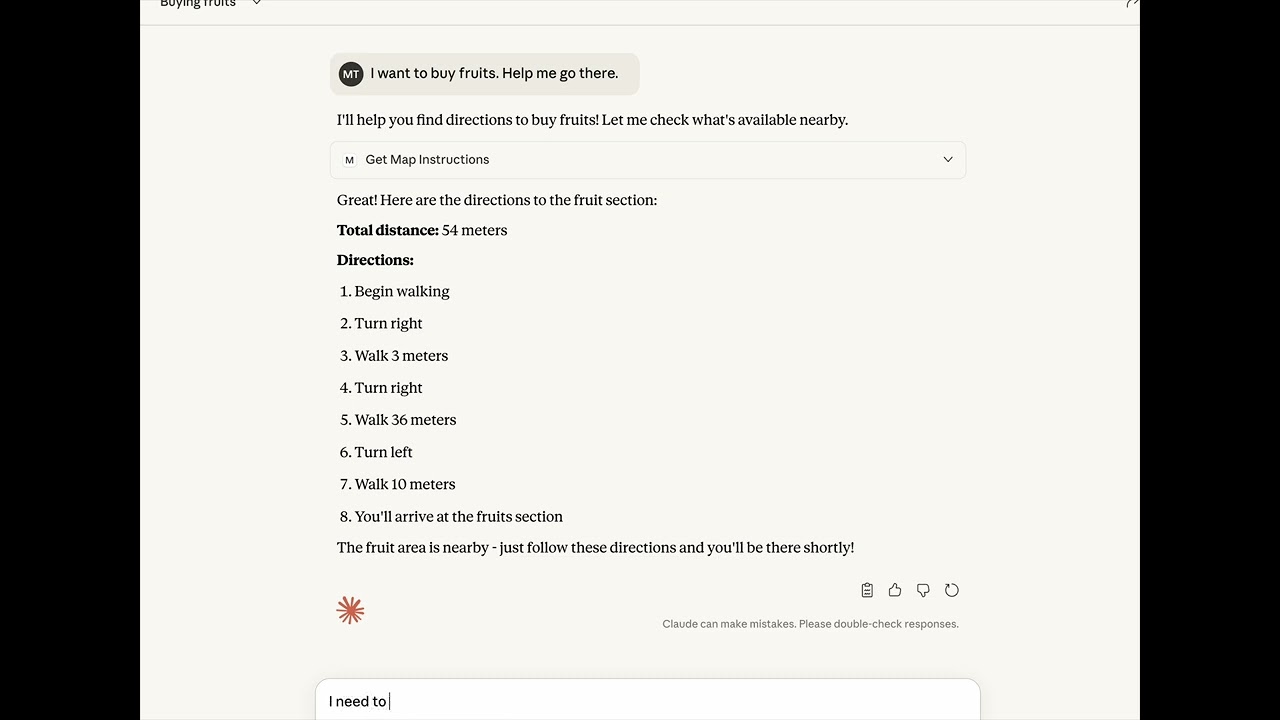
✨ Key Features
🧭 Indoor Navigation
- Turn-by-turn directions from current location to any destination within the mapped venue
- Multi-floor navigation with support for elevators, escalators, and stairs
- Distance calculations with total route distance in meters
- Voice-optimized directions formatted for text-to-speech systems
🔍 Smart Location Search
The server intelligently searches for destinations across multiple location types:
- Spaces (e.g., stores, rooms, departments)
- Objects (e.g., ATMs, information desks, benches)
- Points of Interest (POIs)
- Location Categories (e.g., restaurants, restrooms)
- Doors and entry/exit points
📍 Location State Management
- Persistent location tracking - stores user's current location in a JSON file
- Automatic location updates - updates current location after each navigation request
- Default starting point - initializes to "Entrance" if no location is set
🎙️ Voice-Friendly Output
Navigation instructions are formatted for optimal voice delivery:
- Clear, concise turn-by-turn directions
- Natural language descriptions (e.g., "Turn left", "Take the elevator")
- Distance announcements in meters
- Arrival confirmations
🏗️ Architecture
Technology Stack
- Runtime: Bun/Node.js with TypeScript
- MCP SDK:
@modelcontextprotocol/sdkv1.22.0 - Mapping API:
@mappedin/mappedin-jsv6.4.0 - Web Framework: Express v5.1.0
- Validation: Zod v3.23.8
Core Components
1. MCP Server (server.ts)
- Implements the Model Context Protocol server
- Exposes the
getMapInstructionstool to AI agents - Handles HTTP requests via Express
- Manages transport layer for MCP communication
2. Navigation Tool (tool.ts)
- Interfaces with Mappedin API to fetch map data
- Searches for locations across multiple entity types
- Calculates directions between two points
- Formats navigation instructions for output
3. Utilities (utils.ts)
formatNavigationInstructions()- Converts raw Mappedin directions into voice-friendly textsetAndGetCurrentLocation()- Persists user location to diskgetCurrentLocationFromFile()- Retrieves stored location or defaults to "Entrance"getConnectionType()- Identifies floor transition types (elevator, escalator, stairs)
🚀 Getting Started
Prerequisites
- Node.js 18+ or Bun runtime
- Mappedin API credentials (key, secret, and map ID)
Installation
# Clone the repository
git clone <repository-url>
cd mappedin-mcp-server

# Install dependencies
npm install
# or
bun install
Configuration
Set the following environment variables (optional - defaults to demo credentials):
MAPPEDIN_API_KEY=your_api_key
MAPPEDIN_API_SECRET=your_api_secret
MAPPEDIN_MAP_ID=your_map_id
BL_SERVER_PORT=8000
BL_SERVER_HOST=0.0.0.0
Note: The server includes demo credentials for testing purposes. See Mappedin Demo API Keys for terms and conditions.
Running the Server
# Using Bun
bun run server.ts

# Using Node.js with ts-node
npx ts-node server.ts
The server will start on http://0.0.0.0:8000/mcp (or your configured host/port).
📡 API Reference
MCP Tool: getMapInstructions
Retrieves navigation instructions from the user's current location to a specified destination.
Input Schema
{
  destination: string  // Name of the destination (min: 1, max: 100 characters)
}
Output
{
  "content": [
    {
      "type": "text",
      "text": "{\"totalDistance\": 45, \"voiceDirections\": \"Here are your directions: Begin walking. Turn left. Walk 20 meters. Take the elevator to change floors. Exit the elevator. Walk 15 meters. You have reached your destination.\"}"
    }
  ]
}
Response Fields
totalDistance(number): Total distance in metersvoiceDirections(string): Natural language turn-by-turn directions
Special Cases
- Already at destination: Returns distance 0 with message "You are already at the destination."
- No route found: Returns distance 0 with message "No directions found."
💡 Usage Examples
Example 1: Navigate to a Store
{
  "destination": "Apple Store"
}
Response:
{
  "totalDistance": 120,
  "voiceDirections": "Here are your directions: Begin walking. Turn right. Walk 50 meters. Turn left. Walk 70 meters. You have reached your destination."
}
Example 2: Multi-floor Navigation
{
  "destination": "Food Court"
}
Response:
{
  "totalDistance": 85,
  "voiceDirections": "Here are your directions: Begin walking. Walk 30 meters. Take the escalator to change floors. Exit the escalator. Turn right. Walk 40 meters. You have reached your destination."
}
Example 3: Already at Destination
{
  "destination": "Entrance"
}
Response:
{
  "totalDistance": 0,
  "voiceDirections": "You are already at the destination."
}
🔧 Integration with AI Agents
This MCP server is designed to be used by AI agents to provide indoor navigation assistance. Here's how it works:
- Agent receives user request: "How do I get to the Apple Store?"
- Agent calls MCP tool:
getMapInstructions({ destination: "Apple Store" }) - Server processes request:
- Retrieves current location from storage
- Searches for "Apple Store" in the venue
- Calculates route using Mappedin API
- Formats directions for voice output
- Updates current location to "Apple Store"
- Agent receives response: Voice-friendly navigation instructions
- Agent delivers to user: Via text-to-speech or chat interface
🗂️ Location State Persistence
The server maintains user location state in current-location.json:
{
  "currentLocation": "Apple Store"
}
- Created automatically on first use with default "Entrance"
- Updated after each navigation to the destination
- Persists across server restarts
- Enables continuous navigation without re-specifying starting point
🌐 Deployment
Docker Support
# Dockerfile included in repository
docker build -t mappedin-mcp-server .
docker run -p 8000:8000 mappedin-mcp-server
Blaxel Deployment
The server is configured for deployment on Blaxel with blaxel.toml:
[server]
port = 8000
🛠️ Development
Project Structure
mappedin-mcp-server/
├── server.ts           # MCP server setup and Express app
├── tool.ts             # Navigation tool implementation
├── utils.ts            # Helper functions and formatters
├── package.json        # Dependencies and scripts
├── tsconfig.json       # TypeScript configuration
├── Dockerfile          # Container configuration
└── blaxel.toml         # Blaxel deployment config
Key Dependencies
@modelcontextprotocol/sdk- MCP protocol implementation@mappedin/mappedin-js- Mappedin API clientexpress- HTTP server frameworkzod- Schema validation
🔐 Security Considerations
- API credentials should be stored in environment variables
- The demo credentials are for testing only
- Consider implementing rate limiting for production use
- Validate and sanitize destination inputs
📝 License
See repository license file for details.
🙏 Acknowledgments
- Mappedin for indoor mapping platform
- Model Context Protocol for the MCP specification
- Demo map and credentials provided by Mappedin
🤝 Contributing
Contributions are welcome! Please feel free to submit issues or pull requests.
Built with ❤️ for accessible indoor navigation